
Aerofield support
How can we help?
Quick answers about Aerofield, the air traffic game from PuffyWings Studio. It is coming soon to iPhone. Still stuck, found a bug, or have an idea? Email the studio.
How to play
How do I land an aircraft?
Put a finger on the aircraft and drag to a field it can use. The aircraft follows your path. When it reaches the lit end of a runway, lined up with it, it lands by itself. A helicopter lands on a helipad and a seaplane on a water lane.
Start a new stroke on the aircraft at any time to replace its path. A path can only be so long, and a small bar at the top of the screen shows how much of it you have used.
Which aircraft lands where?
- Propeller plane: any runway, long or short.
- Helicopter: a helipad. It can hover while it waits.
- Jet: a long runway.
- Heavy: a long runway. It is slow and turns widely, so start its path early.
- Seaplane: a water lane.
Small symbols painted on every runway, helipad and water lane show what lands there. Not every airfield sends every aircraft.
What is the lit end of a runway?
Every runway has two ends, and only one is lit at a time. The lit end has a green bar and a pale funnel of chevrons. The other end has a red bar. Line up with the funnel to land. The wind decides which end is lit (see the question about the wind below).
Why does a jet or a heavy ignore a short runway?
Jets and heavy aircraft need a long runway. A short strip, such as the second runway on Highlands, is for propeller planes only. If a jet or a heavy lines up with one, it simply flies over. A small cross appears next to the strip, with the symbol of what the strip is for. Nothing is lost.
To check before you draw, touch the aircraft: the fields it can use glow and the others fade.
What does the wind do?
The wind decides which end of each runway is lit. When it shifts, the lit end of a runway can flip. You get about five seconds of warning: the wind chip at the top shows Wind shifts in and counts down, and the SHIFT clock at the bottom runs down to the next shift.

An aircraft that is already landing is not disturbed, and one that is just about to land keeps its approach for a few seconds. An aircraft that arrives lined up with the wrong end flies over and you lose a few points. That is never the end of the round. Helicopters ignore the wind.
What are the fuel rings?
Every aircraft has a fuel ring that drains while it flies. Aerofield warns you twice: first when the fuel is getting low, then when it is nearly empty. The second warning repeats with a tick and a buzz. If an aircraft runs dry, the round ends. An aircraft that is landing burns no fuel, and fuel burns faster inside a storm cell on Storm Coast.
How does a round end?
When two aircraft collide, or when one runs out of fuel. Aircraft that get too close to each other warn you first. After the round you see your score and how many aircraft you landed, and a new best is marked.
How does scoring work?
Every landing scores points, and some aircraft are worth more than others. Landing aircraft one after another builds a multiplier next to your score, up to x5. Your best score is kept for each airfield.
What do the speed and pause buttons do?
Speed is the button at the bottom left. Each tap changes it:
 Normal speed. Every round starts here.
 Fast, but it slows down by itself when something needs your eyes.
 Fast, and it stays fast.
Safe fast slows down for two aircraft close together, an aircraft with its fuel in the red, and the five-second warning before the wind shifts. It speeds up again after a couple of calm seconds.
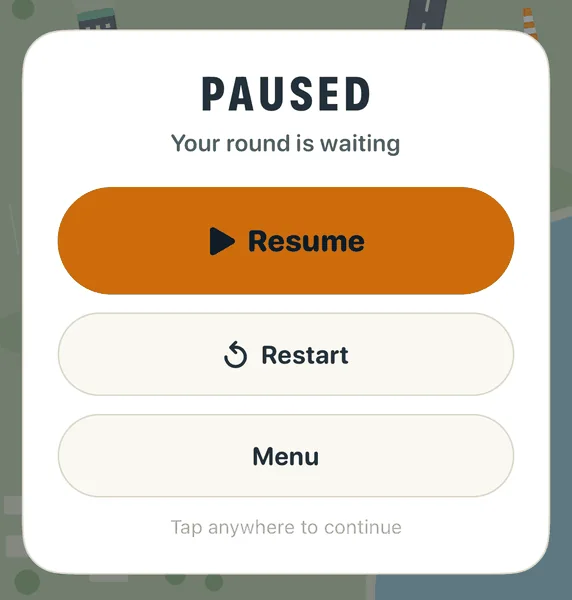
Pause is the button at the bottom right. It freezes the round and shows a card with Resume, Restart and Menu. Restart asks you to tap it a second time, so you cannot restart by accident. You can also tap anywhere on the card to continue.
What does the Landing hints switch do?
It is in Settings > Feel, and it is on by default. While it is on, touching an aircraft lights the fields it can use and fades the others, small marks show where each incoming aircraft will land, and a small cross appears when one lines up with a field it cannot use.
Turn it off for a plainer screen. The symbols painted on the fields always stay.
Do I need internet to play?
No. A round needs no connection. Ads, buying or restoring Aerofield Plus, and the iCloud copy of your progress do need one. If an ad cannot load, the game simply carries on without it.
Progress and iCloud
What does Aerofield save, and where?
On your iPhone, and in your own iCloud: your best score for each airfield, the total number of aircraft you have landed, the days you have played, and the special editions you have earned. iCloud keeps them in a small storage area for the app. Apple looks after it, and we cannot see it.
Your settings (sound, haptics, motion and Landing hints) and the counters that decide when an ad is due stay on the phone only. Purchases come back through your Apple Account instead, with Restore Purchases.
I have a new phone, or I reinstalled. How do I get my progress back?
- Sign in to the same Apple Account, with iCloud on.
- Install Aerofield and open it while you are online.
- Wait up to a minute. Your best scores and totals come back by themselves.
In Settings in the game, the iCloud line says Progress is saved to iCloud when all is well. Your settings do not travel with you, so set sound and Landing hints again. To get Aerofield Plus back, use Restore Purchases (see below).
What do the iCloud messages in Settings mean?
- Progress is saved to iCloud: everything is up to date.
- Saving to iCloud: a sync is under way.
- iCloud is off: your progress stays on this iPhone. Turn on iCloud for Aerofield in the iPhone Settings to keep it safe.
- Could not sync: Aerofield will try again, and your progress is safe on this iPhone.
Can I play on two phones?
Yes, with the same Apple Account. Your best score for each airfield keeps the higher number, your total landings add up across both phones, and a day played on either counts as one day.
My progress did not come back
Check that you are signed in with the same Apple Account, that iCloud is on for Aerofield, and that you are online. Leave the app open for a few minutes. If nothing comes back, email us your iPhone model, your iOS version and the words the iCloud line in Settings shows.
Aerofield Plus and ads
What is Aerofield Plus?
A one-time purchase with no subscription. It gives you no ads, ever, and the Orbit special edition (coming). The App Store shows the price for your country before you buy, and Apple handles the payment.
How do I restore Aerofield Plus?
Open Aerofield, tap Settings, find the Aerofield Plus card and tap Restore Purchases. Use the same Apple Account you bought with. Aerofield Plus is not kept in iCloud with your progress: it comes back through your Apple Account.
Still missing? Email us with the order ID from your receipt email and we will sort it out.
How do I turn off the ads?
Buy Aerofield Plus: open Settings and tap Get Aerofield Plus. That is the only way to turn the ads off, and it turns them off for good. Once you own it, there are no ads, so Aerofield no longer shows Google’s consent form or asks the tracking question.
When do ads appear?
- Only one kind: a full-screen ad, from Google AdMob.
- Only after a round has ended, and only when you tap Fly again or Menu. Never during a round, never over the airfield, never when the app opens.
- None in your first three rounds.
- After that, at most one for every three rounds you finish, and never within three minutes of the last one.
- A round shorter than a minute does not count, and a round that sets a new best is never followed by an ad.
- If an ad is not ready, it is skipped and the game carries on.
Can my family share Aerofield Plus?
Not through Family Sharing: it belongs to the Apple Account that bought it.
Who handles refunds?
Apple processes every purchase, so refund requests go to Apple, through reportaproblem.apple.com. We never see your payment details.
Privacy and choices
Where are my privacy choices?
In Aerofield: where Google’s consent form applies (for example in the European Economic Area and the United Kingdom), Settings has a Privacy section with a Privacy choices row that opens the form again. It is shown only while ads are in play, so it is gone once you own Aerofield Plus.
On your iPhone: Settings > Privacy & Security > Tracking lets you allow or stop tracking for Aerofield at any time.
The Privacy Policy explains everything Aerofield handles.
What is the tracking question after my first round?
After you finish a round, iOS asks whether Aerofield may track you across other companies’ apps and websites. It asks once, a moment after the round ends, and never when the app opens. You can say no and still play everything. If you say no, ads cannot use your advertising identifier.
What does Aerofield collect?
Aerofield has no accounts and no analytics tool of its own, and the app sends nothing to the studio. Google’s ad software, which shows the ads, collects some data (the Privacy Policy lists it). Apple handles purchases and iCloud.
How do I delete my data?
The studio holds none, so there is nothing to delete on our side. Deleting the app removes what is saved on your phone. Your progress also lives in your own iCloud, so it comes back if you reinstall. To remove that copy, use the iCloud storage settings on your iPhone, which are Apple’s. Questions? Email us.
How old do I need to be?
Aerofield is made for a general audience and is not directed to children under 13. Parents can manage purchases with Screen Time and Ask to Buy on iPhone.
Your iPhone and settings
What can I change in Settings?
Open Aerofield, then tap Settings on the title screen.
- Sound: a main switch, plus Music and Effects, each with its own switch and volume.
- Feel: Haptics, Reduce Motion and Landing hints. Aerofield also follows the Reduce Motion setting of your iPhone.
- iCloud: whether your progress is saved.
- Aerofield Plus: buy it or restore it.
- Privacy: Privacy choices, where they apply.
- About: the app version.
Does it follow Dark mode and my text size?
The menus and panels follow your iPhone’s Light or Dark setting and its text size. The airfield keeps its own sky, which runs from dawn towards night during a round.
Which phones does Aerofield work on?
Aerofield runs on iPhone. It plays upright. The airfield has the same layout and the same rules on every iPhone, so a score means the same thing on every phone.
The game froze or closed unexpectedly
Close the app completely, open it again, and make sure you have the latest version from the App Store. If it keeps happening, email us your iPhone model, your iOS version, the app version and what you were doing.
More help
Read the Aerofield Privacy Policy, or go back to the Aerofield page.
Looking for help with another game? Go to PuffyWings support or Boxdini support.